


Kids police - for parents
4.4602.00 Reviews
App Specs
- Version
- 1.2.4
- Updated On
- License
- Free
- Downloads
- 1,000,000+
- Developer
- Kids police
- Categories
- Parenting
- Platform
- Android
Screenshots

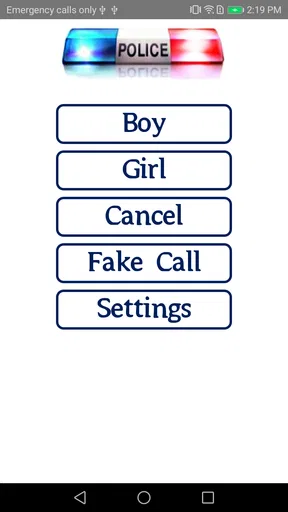
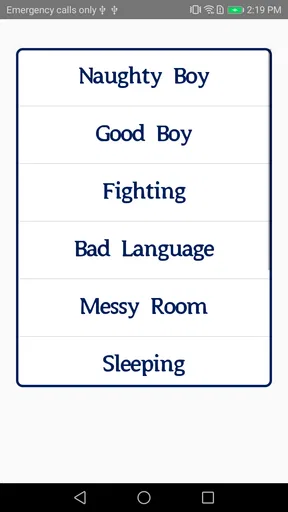
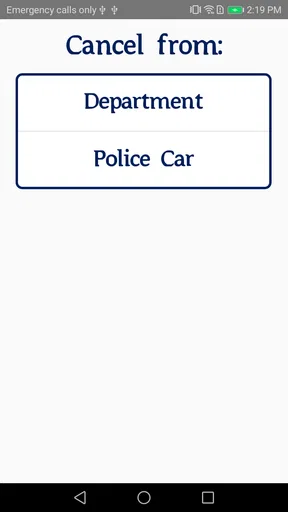
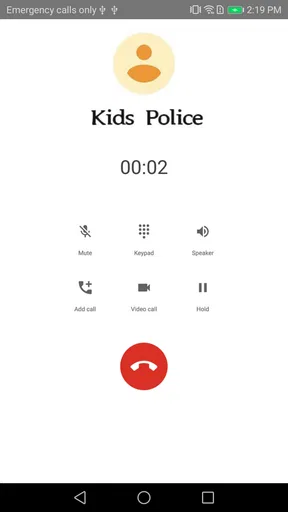
 Analysis by AppCompare
Parenting apps often promise to make difficult moments easier, but discipline is rarely solved by a single button. After spending time with Kids police, I found a very focused tool: it is designed to help parents respond to children’s behavior with more structure, especially when a household needs a simple reminder of agreed rules rather than another complicated system. The app is free, aimed at Everyone, and comes from Kids police, a developer whose work here stays centered on parenting.
My first impression is that Kids police is best understood as a practical aid for consistency. It does not replace a conversation, a bedtime routine, or a parent’s judgment. Instead, it gives families a way to turn vague instructions such as “behave better” into clearer expectations and follow-up. That distinction matters. If you want a full family organizer, a child-development course, or a detailed reward chart with extensive customization, this may feel limited. If you want a lightweight companion for everyday discipline, its narrow purpose can be useful.
How Kids police fits into everyday parenting
The app belongs to the parenting category and has been available since November 3, 2014. Its current version is 1.2.4, and it requires Android 5.0 or later. That makes it relevant to parents who keep an older phone for family use, although the experience will naturally depend on the device and operating system. The service has passed one million installs and holds a 4.4 average from around 4.1 thousand ratings, with roughly 602 written reviews. Those figures suggest that the basic idea has reached a substantial audience, while the written feedback is still worth reading for details that matter to your own household.
I would not install it expecting an automated parenting solution. The useful part is the parent’s decision before opening the app: choose one behavior to address, decide what a reasonable consequence or correction looks like, and use the app to keep the response steady. That preparation prevents a common mistake in discipline tools, where parents react differently every time because they are tired or rushed.
A realistic example is the evening screen-time argument. A child keeps delaying the handover of a phone or tablet, and the parent repeats the same instruction several times. Kids police can serve as a neutral reference point for the rule already agreed at a calmer moment. The important workflow is to discuss the expectation before the conflict, then consult the app during the difficult moment instead of inventing a new punishment. This approach makes the tool more helpful than simply opening it after a disagreement has already escalated.
Speed expectations when you need a quick reminder
For this kind of app, perceived speed is less about elaborate animations and more about how quickly a parent can reach the relevant information. Kids police has a focused purpose, so it should be approached as a quick check-in rather than a place to spend a long time configuring a family system. In my experience with parenting tools of this type, every extra screen or unclear label becomes especially frustrating when a child is waiting and emotions are already high.
The strongest speed advantage is conceptual: you are not trying to manage an entire calendar, school schedule, meal plan, and reward economy at once. A parent can concentrate on the behavior in front of them. That narrow scope reduces mental load, provided the household has already agreed on what the app is meant to support.
Worth Reading Before You Choose

EA SPORTS FC Mobile 26 Is a Bigger Football Game, but It Takes Time

Flipboard Shows What News Apps Must Do Beyond the Feed

Switching to Android Auto Means Rethinking Your Driving Routine

Google Calendar Makes a Crowded Week Easier to Manage

Ludo King Makes the Most of the Minutes Between Plans

Baby Panda World Brings Quick Play to Modern Phones, but Its Game Library Feels Busy
There is also a trade-off. A simple discipline app may feel fast because it asks less of you, but it may not provide the detailed history or flexible organization that some parents expect. If you need to compare behavior across several children, coordinate responsibilities between adults, or maintain a long-term record, a dedicated family organizer may be quicker overall because it is built for those tasks. Kids police is more suitable when the priority is immediate clarity.
What happens during heavy-use moments
The demanding moments for this app are not necessarily technical. They are the busy transitions that test whether a parenting routine is practical: leaving for school, stopping play for dinner, getting ready for bed, or ending a device session. During these moments, parents have little patience for typing, repeated setup, or a system that requires careful attention.
I recommend using Kids police before those transitions become confrontations. Spend a quiet minute earlier in the day deciding which rule matters most. For example, if mornings are difficult, focus on getting dressed and preparing the school bag rather than trying to correct every small distraction. A single target makes the app easier to use and gives the child a fairer expectation.
Another useful technique is to keep the app from becoming the center of the confrontation. Showing a child a rule can help, but repeatedly holding up a phone may turn the tool into another source of distraction. In a family with younger children, the parent should translate the rule into simple spoken language and put the device away. The app works best as a support for the adult, not as a substitute for direct communication.
Heavy use can also expose the limits of a narrowly focused tool. If several children have different needs at the same time, one app may not be enough to keep the situation organized. A paper chart on the refrigerator can sometimes be clearer for a whole family because everyone can see it without passing around a phone. Kids police is more attractive when the parent wants a private prompt or a consistent reference, not a large shared dashboard.
Reliability and the role of consistency
Reliability in parenting software has two sides. The first is technical: the app should open and remain usable on a supported device. The second is behavioral: the parent must apply the same standard often enough for the child to understand it. Even a stable app cannot compensate for rules that change from one evening to the next.
Kids police is most dependable when it is part of a routine established outside the app. I would use it to prepare a small set of household expectations, then revisit those expectations when the child is calm. Avoid changing the consequence in the middle of an argument simply because the first response did not work immediately. That kind of improvisation weakens trust and can make any discipline tool appear ineffective.
The app’s long availability and large install base make it feel like an established option rather than a brand-new experiment. Still, I would keep expectations realistic. A high average rating does not mean every family will find the same approach effective. Children differ in age, temperament, communication ability, and support needs. A method that helps with ordinary resistance may be unsuitable when behavior reflects anxiety, developmental differences, bullying, or a serious family problem.
Parents should also agree with one another before relying on the app. If one adult treats the tool as a calm reminder while another uses it to threaten or shame the child, the inconsistency will become more noticeable than any benefit. The best result comes from presenting rules as predictable boundaries, not as a police-style contest that the child must lose.
Device constraints and practical setup
Kids police is free, which removes the biggest barrier to trying it. Its Everyone content rating also makes it broadly suitable for family devices, although parents should still decide how and when children interact with it. The Android requirement of version 5.0 or later is modest by current standards, so it may work on an older spare phone, but an outdated device can still affect comfort through a small screen, slow storage, or general system wear.
For a smoother experience, I would avoid introducing the app for the first time during a crisis. Open it beforehand, learn where the relevant information is, and decide whether it fits your parenting language. This is a small preparation step, but it prevents the parent from looking uncertain in front of the child. It also reveals whether the app’s organization matches the way your family thinks about rules.
Battery and storage demands are important considerations for any parent who uses an older device, but I would not treat Kids police as a replacement for a full-time monitoring service. Its value is in occasional guidance rather than constant activity. If your phone is already overloaded with apps, notifications, and family accounts, a simple written routine may create less friction. Conversely, if you already carry your phone everywhere, having the guidance available in the same place can be more convenient than keeping a separate notebook.
Privacy and device-sharing habits should also shape your choice. A parent using a shared family phone should make sure that children cannot casually alter the household approach or turn the tool into a game. The app should support an adult-led routine. For older children who are ready to participate in setting goals, a visible chart or a collaborative family planner may feel more respectful and motivating than a parent-controlled tool.
Where it is stronger than usual alternatives
The usual alternatives fall into three groups: spoken reminders, paper behavior charts, and broader family-management apps. Spoken reminders are immediate and personal, but they disappear quickly and can become repetitive. Paper charts are visible and easy for children to understand, yet they require manual upkeep and may not travel well. Full family apps handle schedules, chores, rewards, and communication, but their extra features can bury the one rule a parent needs at a stressful moment.
Kids police occupies the middle ground. It offers more structure than an improvised warning without demanding the administrative effort of a complete household management system. That is its clearest strength. It can help a parent pause, choose a consistent response, and avoid making discipline entirely dependent on mood.
Its weakness is the same narrowness. Families looking for detailed progress tracking, shared calendars, school coordination, or a rich reward economy should choose a tool designed around those functions. Parents who prefer attachment-focused conversations and natural consequences may also find that an app adds unnecessary distance. In those homes, a printed agreement discussed together could be more effective and less distracting.
Who should use it, and who should skip it
I would recommend Kids police to parents who are dealing with recurring everyday behavior problems and want a simple structure for responding. It is especially suitable when adults in the same home need to agree on a consistent approach, or when a parent tends to forget the rule they intended to enforce after a tiring day. The free price makes experimentation easy, and the broad age rating makes it approachable for a general family audience.
I would skip it if you expect the app to diagnose behavior, supervise a child automatically, or settle serious conflicts without adult involvement. It is also not the right first choice for parents seeking a detailed developmental program or a comprehensive family dashboard. In those cases, professional guidance, a specialized parenting resource, or a more complete organizer would be a better fit.
My most practical advice is to test it with one recurring issue for a week rather than applying it to every behavior at once. Choose a specific expectation, explain it when everyone is calm, and observe whether the app helps you respond more consistently. If it creates more arguments, more screen distraction, or more confusion, remove it from that routine. A parenting tool should reduce friction, not become another thing the family has to manage.
Final performance verdict
From a performance perspective, Kids police makes sense as a focused, occasional-use parenting app. Its modest Android requirement and free access make it easy to try on a range of devices, while its established presence and strong average rating indicate that many users find the central idea worthwhile. I would expect the app to feel most responsive when used for short consultations rather than prolonged, multi-child administration.
The more important verdict is practical: it can improve discipline only when the parent supplies the calm explanation and follows through fairly. The app is not a magic behavior changer, and its focused design will feel restrictive to families wanting records, collaboration, or extensive customization. But for a parent who needs a straightforward aid during repeated household struggles, it offers a reasonable starting point.
My recommendation is cautious but positive: try Kids police when your main problem is inconsistency, not when you need a complete parenting system. Use it before difficult moments, keep the rule specific, and let conversation remain more important than the screen. In that role, this free parenting app can be a useful little support rather than an overpromising solution.
Pros
- Simple interface makes core features easy for parents to find.
- Can help children learn basic police and safety concepts.
- Suitable for short
- supervised learning sessions.
- Child-friendly presentation avoids overly complex instructions.
- Useful as an occasional educational activity for younger children.
Cons
- Content may feel too basic for older children.
- Some features may require an internet connection to work properly.
- Limited depth means it may not replace broader safety education.
- Children may lose interest after repeated use.
- Parental supervision is still needed when discussing real-world safety topics.
FAQs for Kids police - for parents
What is Kids police - for parents, and who is it designed for?
Kids police - for parents is a family-oriented application intended to help parents stay informed about their children’s activities and support safer digital habits. Its usefulness depends on the features available in the current version, but parents should generally expect tools related to supervision, communication, or family safety. It is best suited to parents who want an additional way to organize and monitor age-appropriate device use.
Does Kids police - for parents require permission from my child?
Parents should review the app’s permission requests and explain its use to their children before installation. Depending on the features enabled, the application may request access to notifications, location, device activity, contacts, or other information. Transparent communication is important because hidden monitoring can damage trust. Always check the official privacy policy and local regulations before using supervision features.
Is Kids police - for parents free to download and use?
The application may be available as a free download, but some functions can require in-app purchases, a subscription, or a premium plan. Before creating an account or connecting a child’s device, check the store listing for current pricing, trial conditions, renewal terms, and cancellation instructions. Availability and costs may also differ between Android and iOS versions or by country.
What privacy and security issues should parents consider?
Because a parental-control application can handle sensitive family information, privacy should be one of the main considerations before downloading it. Read the developer’s privacy policy to understand what data is collected, where it is stored, how long it is retained, and whether it is shared with third parties. Use a strong password, enable account security options, and keep the app updated.
Will Kids police - for parents work on every Android or iPhone device?
Compatibility can vary according to the device model, operating-system version, region, and whether the app requires a companion installation on a child’s phone. Some monitoring functions may be limited by Android or iOS privacy restrictions, battery-saving settings, or manufacturer-specific permissions. Before installing, compare the listed requirements with both parent and child devices, and verify that the needed features are supported.


